1 min read
How to resize VirtualBox virtual machine storage on OSX
I ran out of space on a VirtualBox Windows VM recently and needed to resize the virtual hard disk. I searched around and these are the steps that ultimately worked for me.
- Power down the VM.
- Open a terminal, and navigate to the directory in which the virtual machine’s disk (*.vdi file) resides.
- Execute this: VBoxManage modifyhd YOUR_HARD_DISK.vdi –resize SIZE_IN_MB
- Power up the VM.
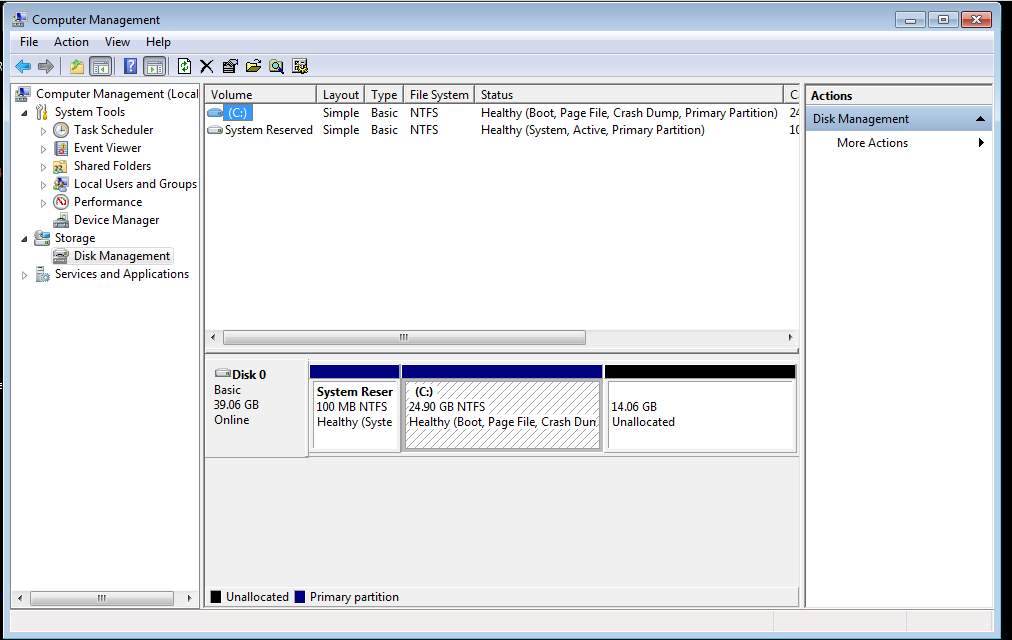
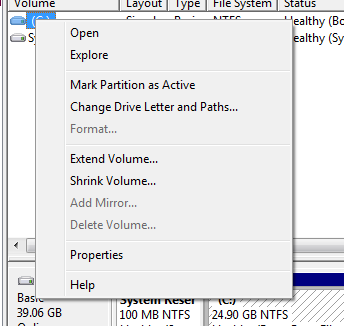
- Right click on “Computer” and choose “Manage.” Go to “Storage,” right click on the volume, and choose “Extend Volume.” Follow the prompts to expand the partition to fill the newly-allocated space.
Troubleshooting:
- If the Windows VM initially doesn’t recognize the new storage space, try rebooting it.
- If the virtual drive wasn’t set up as dynamic, you may need to clone it onto a dynamic drive and resize that one. There are guides elsewhere on how to do this.
- If you’re on a Linux host, steps 1-4 will be the same. Just use gparted or a similar utility to resize the partition.